Software API
Low-level UART (Serial) Functions
Note
If you are connected to the FPGA via the VLAB, then the VLAB runs a serial terminal directly and you can communicate with your FPGA through the VLAB client. You can ignore this bit.
Xilinx SDK has a serial terminal that can be used to communicate with your design. It is in the bottom panel under the heading “SDK Terminal”. However, this terminal is line buffered, which means that nothing is sent until you have written a line of text and clicked “Send”. If you want to communicate using individual keypresses, you need to use a better serial terminal program. We recommend using GNU screen. You can connect screen by opening a terminal and typing
screen /dev/ttyUSB2 115200Note that sometimes the FPGA appears on a different device node, so you might have to try /dev/ttyUSB0 or /dev/ttyUSB1.
Most of the time you can use the serial/UART just by using the C standard library. Functions like printf and scanf will work with the UART to output and input accordingly. However you will probably find that lower-level access to the UART hardware is preferable because scanf is line buffered and will block until a newline is received, which stops you from being able to do anything else. You can use the functions in xuartps_hw.h to do this. For example:
#include "xuartps_hw.h"

int main(void) {
	if(XUartPs_IsReceiveData(STDIN_BASEADDRESS)) { //If the user has pressed a key
	  char byte = XUartPs_RecvByte(STDIN_BASEADDRESS); //Read it in
	  XUartPs_SendByte(STDOUT_BASEADDRESS, byte); //And send it out
  }
}
These functions let you read and write individual bytes.
Measuring Time
The ARM core contains a monotonically increasing counter, which can be used to measure time in the system without controlling a full countdown timer manually (detailed below). The timer increases at half the ARM clock frequency (i.e. every two clock cycles). Time can be accessed using the XTime functions, as follows:
#include <xiltimer.h>
#include <sleep.h>

int main() {
    XTime startTime, endTime, executionTime;

	usleep(1000); //This shouldn't be necessary but without it the time functions only return 0

    XTime_GetTime(&startTime);
    // Perform execution here
    XTime_GetTime(&endTime);

    executionTime = endTime - startTime;
    float timeInSecs = 1.0 * executionTime / COUNTS_PER_SECOND;
}
Ethernet
The ARM cores can use the Zybo’s Ethernet connection to send and receive messages over the network. To use the Ethernet you need to modify the platform component which your application is built on. If you don’t know which platform that is, then you can go into your application, go to Settings -> vitis-comp.json and look at the Platform field.
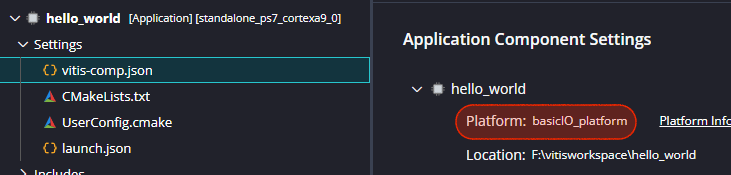
- Go to that platform (
basicIO_platformin the above image) and go toSettings -> vitis-comp.json. - Select
Board Support Package - Tick the
lwip220(Lightweight IP) library. (Note: this may be a higher number if a more recent version has been released.) - In the list on the left, under
standalone, clicklwip220. This shows the settings for the library. - Set
lwip220_dhcptotrue.
This will bring in the Lightweight IP library, and set it to obtain an IP address by DHCP when your system boots. We also need to turn on some system timers that lwIP will use.
- In the list on the left, under
standalone, clickxiltimer. - Set
XILTIMER_en_interval_timertotrue - Set
XILTIMER_tick_timertops7_scutimer_0
(The tools used to turn the timer on automatically, but in 2025 we have to do it manually. Why? Because they hate you that’s why.)
Add the following two platform files to your project (or replace them if they already exist). They set up various parts of the system and initialise the hardware.
platform.c
#include <stdio.h>
#include "platform.h"
#include "xil_cache.h"
#include "xparameters.h"
#include "lwip/ip.h"
#include "netif/xadapter.h"
#include "xiltimer.h"
#include "xinterrupt_wrap.h"

// Zynq PS GEM0 base address
#define PLATFORM_EMAC_BASEADDR 0xe000b000

// Default network configuration
#define DEFAULT_IP_ADDRESS  PP_HTONL(LWIP_MAKEU32(192, 168,   1, 10))
#define DEFAULT_NETMASK     PP_HTONL(LWIP_MAKEU32(255, 255, 255,  0))
#define DEFAULT_GATEWAY     PP_HTONL(LWIP_MAKEU32(192, 168,   1,  1))

// DHCP timeout is 240 timer interrupts before giving up. 240*50ms = 12 seconds
#define DHCP_TIMEOUT 240

// Check for ethernet link every second
#define ETH_LINK_DETECT_INTERVAL 20


#if LWIP_DHCP==1
#include "lwip/dhcp.h"
#endif

#if LWIP_DHCP_DOES_ACD_CHECK
#include "lwip/acd.h"
#endif

#if LWIP_DHCP==1
volatile int dhcp_timoutcntr = DHCP_TIMEOUT;
void dhcp_fine_tmr();
void dhcp_coarse_tmr();
#endif

void lwip_init();

static struct netif server_netif;
static struct netif *echo_netif;

static void timer_callback(void *CallBackRef, u32_t TmrCtrNumber)
{
	(void)CallBackRef;
	(void)TmrCtrNumber;
	static int DetectEthLinkStatus = 0;

#if LWIP_DHCP==1
	static int dhcp_timer = 0;
	static int dhcp_finetimer = 0;
#if LWIP_DHCP_DOES_ACD_CHECK == 1
	static int acd_timer = 0;
#endif
#endif

	DetectEthLinkStatus++;

#if LWIP_DHCP==1
	dhcp_timer++;
	dhcp_finetimer++;
	dhcp_timoutcntr--;
#if LWIP_DHCP_DOES_ACD_CHECK == 1
	acd_timer++;
#endif

	if (dhcp_finetimer % 10 == 0)
		dhcp_fine_tmr();

	if (dhcp_timer >= 1200) {
		dhcp_coarse_tmr();
		dhcp_timer = 0;
	}

#if LWIP_DHCP_DOES_ACD_CHECK == 1
	if (acd_timer % 2 == 0)
		acd_tmr();
#endif
#endif

	if (DetectEthLinkStatus == ETH_LINK_DETECT_INTERVAL) {
		eth_link_detect(echo_netif);
		DetectEthLinkStatus = 0;
	}
}

void init_platform()
{
	Xil_ICacheEnable();
	Xil_DCacheEnable();

	XTimer_SetInterval(50);
	XTimer_SetHandler(timer_callback, 0, XINTERRUPT_DEFAULT_PRIORITY);
}

void cleanup_platform()
{
	Xil_DCacheDisable();
	Xil_ICacheDisable();
}


struct netif *init_network(unsigned char *mac_address)
{
	ip_addr_t ipaddr, netmask, gw;

	echo_netif = &server_netif;

#if LWIP_DHCP==1
	ipaddr.addr = 0;
	gw.addr = 0;
	netmask.addr = 0;
#else
	ipaddr.addr  = DEFAULT_IP_ADDRESS;
	netmask.addr = DEFAULT_NETMASK;
	gw.addr      = DEFAULT_GATEWAY;
#endif

	lwip_init();

	if (!xemac_add(echo_netif, &ipaddr, &netmask, &gw, mac_address, PLATFORM_EMAC_BASEADDR)) {
		xil_printf("Error adding N/W interface\n\r");
		return NULL;
	}

	netif_set_default(echo_netif);
	netif_set_up(echo_netif);

#if LWIP_DHCP==1
	dhcp_start(echo_netif);
	dhcp_timoutcntr = DHCP_TIMEOUT;

	while (((echo_netif->ip_addr.addr) == 0) && (dhcp_timoutcntr > 0))
		xemacif_input(echo_netif);

	if (dhcp_timoutcntr <= 0) {
		if ((echo_netif->ip_addr.addr) == 0) {
			xil_printf("DHCP Timeout\r\n");
			xil_printf("Configuring default IP\r\n");
			echo_netif->ip_addr.addr = DEFAULT_IP_ADDRESS;
			echo_netif->netmask.addr = DEFAULT_NETMASK;
			echo_netif->gw.addr      = DEFAULT_GATEWAY;
		}
	}

	ipaddr.addr = echo_netif->ip_addr.addr;
	gw.addr = echo_netif->gw.addr;
	netmask.addr = echo_netif->netmask.addr;
#endif

	xil_printf("Board IP: %s\n\r", ipaddr_ntoa(&ipaddr));
	xil_printf("Netmask : %s\n\r", ipaddr_ntoa(&netmask));
	xil_printf("Gateway : %s\n\r", ipaddr_ntoa(&gw));

	return echo_netif;
}

void handle_ethernet(struct netif *netif)
{
	xemacif_input(netif);
}
platform.h
#ifndef __PLATFORM_H_
#define __PLATFORM_H_

// Code heavily based on Xilinx/AMD's lwip_echo_server example, edited down for clarity

#include "lwip/ip.h"
#include "netif/xadapter.h"

#ifdef __cplusplus
extern "C" {
#endif

void init_platform();
void cleanup_platform();

struct netif *init_network(unsigned char *mac_address);
void handle_ethernet(struct netif *netif);

#ifdef __cplusplus
}
#endif

#endif
- Create a
main.cand follow the code structure as in the examples below.
If you are working in C++ then rename platform.c to platform.cpp and the tools should automatically use the correct compilation.
Using the Ethernet
The following code structure shows examples of how to use the ethernet:
ethernet_main.c
#include <stdio.h>
#include "xil_printf.h"
#include "platform.h"
#include "lwip/udp.h"
#include "lwip/pbuf.h"

#define UDP_LISTEN_PORT 9000

//Prototypes
static void recv_callback(void *arg, struct udp_pcb *pcb, struct pbuf *p, const ip_addr_t *addr, u16_t port);
static int start_udp_listener();


int main() {
	unsigned char mac_address[] = { 0x00, 0x11, 0x22, 0x33, 0x00, 0xXX }; // Put your MAC address here!
	struct netif *netif;

	init_platform();

	netif = init_network(mac_address);
	if (!netif)
		return -1;

	start_udp_listener();

	while (1) {
		handle_ethernet(netif);
	}

	cleanup_platform();
	return 0;
}


static int start_udp_listener() {
	struct udp_pcb *pcb;
	err_t err;

	/* A PCB (Protocol Control Block) is lwIP's internal bookkeeping
	 * structure for a network connection. It tracks the local/remote IP,
	 * port numbers, and state. udp_new() allocates one. */
	pcb = udp_new();
	if (!pcb) {
		xil_printf("Error creating UDP PCB\n\r");
		return -1;
	}

	/* Bind this PCB to a local port so we can receive packets on it.
	 * IP_ADDR_ANY means accept packets on any of our IP addresses. */
	err = udp_bind(pcb, IP_ADDR_ANY, UDP_LISTEN_PORT);
	if (err != ERR_OK) {
		xil_printf("Unable to bind to port %d: err = %d\n\r", UDP_LISTEN_PORT, err);
		return -2;
	}

	/* Register a callback. Whenever a UDP packet arrives on this
	 * port, lwIP will call recv_callback with the packet data.*/
	udp_recv(pcb, recv_callback, NULL);

	xil_printf("UDP listener started on port %d\n\r", UDP_LISTEN_PORT);
	return 0;
}

//This is set up by start_udp_listener to get called when packets arrive
static void recv_callback(void *arg, struct udp_pcb *pcb, struct pbuf *p, const ip_addr_t *addr, u16_t port) {
	xil_printf("UDP recv %d bytes from %s:%d\n\r", p->tot_len, ipaddr_ntoa(addr), port);

	for (u16_t i = 0; i < p->len; i++)
		xil_printf("%c", ((char *)p->payload)[i]);

	xil_printf("\n\r");

	pbuf_free(p);
}


/*
 * Example of sending a UDP message to a given IP and port.
 * Sending UDP data in lwIP requires:
 *   A PCB: the control block that represents this end of the connection
 *   A pbuf: a buffer that holds the payload to send
 *   A destination IP + port
 * This frees the pbuf and pcb after sending, but if you need to send
 * repeatedly you can keep the pcb around and reuse it.
 */
void send_udp_example()
{
	struct udp_pcb *pcb;
	struct pbuf *p;
	ip_addr_t dest_ip;
	u16_t dest_port = 9000;
	const char *msg = "Hello from Zynq";
	u16_t len = strlen(msg);

	IP4_ADDR(&dest_ip, 192, 168, 1, 100);

	// Allocate a new PCB for sending
	pcb = udp_new();
	if (!pcb) return;

	// Allocate a pbuf to hold our payload
	p = pbuf_alloc(PBUF_TRANSPORT, len, PBUF_RAM);
	if (!p) {
		udp_remove(pcb);
		return;
	}

	// Copy message into pbuf and send it
	memcpy(p->payload, msg, len);
	udp_sendto(pcb, p, &dest_ip, dest_port);

	// Clean up
	pbuf_free(p);
	udp_remove(pcb);
}
Important things to note:
- The above code is just to show sample usage, and will not compile as it is.
- You must use a unique MAC address. In EMBS these are listed on the EMBS Student Network page.
- Sending and receiving requires a packet buffer (
pbuf). You must remember to free these after using them. - Sending and receiving also requires Protocol Control Blocks (PCBs). While you can remove these when you’ve finished using them, we recommend re-using them if you’re going to send or receive more than once.
- After setting up any handlers you must call
handle_ethernet().
If you don’t have DHCP
The default ethernet code uses DHCP to automatically obtain an IP address from the network, based on your MAC address. If DHCP requests aren’t working, it often means you’re not connected to the network correctly, or you have a problem with your code. There could also be network issues, so ask a demonstrator if unsure.
If you’re sure that you shouldn’t be using DHCP (e.g. if you’re not using the EMBS network), you can use a manual IP address as follows:
- Set up the application and BSP as above.
- Right click your BSP and click Board Support Package Settings. In the left-hand column, under
standalone, clicklwip202. - Expand
dhcp_optionsand setdhcp_does_arp_checkandlwip_dhcpboth to false.
Now you must provide an IP address and subnet mask manually, as below:
int main() {
	ip_addr_t ipaddr, netmask;
	IP4_ADDR(&ipaddr, 192, 168, 0, 30);
	IP4_ADDR(&netmask, 255, 255, 255, 0);
	unsigned char mac_ethernet_address[] = {0x00, 0x0a, 0x35, 0x00, 0x07, 0x02};
	init_platform(mac_ethernet_address, &ipaddr, &netmask);
	...
}
Sharing Memory Between HLS and the ARM
To share a large amount of data between the ARM cores and an HLS component you will use main system memory. The Zybo Z7 has 1GB of main DDR memory which can be accessed from an HLS component by using an AXI Master interface on the HLS core.
Look at this diagram. It helps to understand how the system is laid out.
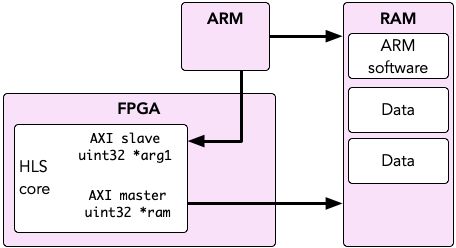
The ARM cores read and write data from main memory. Your HLS core is controlled by the ARM over its slave interface, but it can also access main memory via its master interface. For this reason, you should see why it doesn’t make sense to ask “how do I pass data from the ARM core to HLS?”. The data is always in memory, instead the ARM core simply needs to tell the FPGA where to look for it.
We can see therefore that the HLS core and the ARM cores are reading and writing from the same memory. Therefore we will declare a segment of that memory that we can use for sharing. The easiest way to do this is to declare a global array, then pass the address of the shared memory into the HLS component using XToplevel_Set_ram:
int sharedmemory[1000]; //Reserve 1000 integers (4000 bytes)

int main(void) {
	//Pass the address to the hardware.
	XToplevel_Set_ram(&hls, sharedmemory);

	//Rest of the application...
}
In HLS we can read and write from RAM address 0 and it will be offset by the value we passed in with XToplevel_Set_ram to access the shared memory:
uint32 toplevel(uint32 *ram, uint32 arg1) {
	#pragma HLS INTERFACE m_axi port=ram offset=slave bundle=MAXI
	#pragma HLS INTERFACE s_axilite port=arg1 bundle=AXILiteS register
	#pragma HLS INTERFACE s_axilite port=return bundle=AXILiteS register

	ram[0] = 1234;
	ram[1] = 5678;

	//Or to bulk read/write memory we can use memcpy. eg. to write an array to RAM...
	int output[1000];
	memcpy(ram, output, 4000);
}
In the example above we declared 4000 bytes to use as shared memory between HLS and the ARM cores. This is not only “input” data, it isshareddata. If your algorithm needs to read in some input data and produces a chunk of output data, you can arrange it all in the array accordingly. For example, imagine a problem which takes in 400 bytes and produces 400 bytes:
int sharedmemory[200]; //400 bytes of input, 400 bytes of output == 800 bytes, or 200 ints.

//Prepare input data
for(int i = 0; i < 100; i++) sharedmemory[i] = get_input_data(i);

//Run the IP core
XToplevel_Set_ram(&hls, sharedmemory);
XToplevel_Start(&hls);
while(!XToplevel_IsDone(&hls));

//sharedmemory[100] to sharedmemory[199] contains the output data

//-------------------------
//Meanwhile in HLS...

uint32 toplevel(uint32 *ram) {
	#pragma HLS INTERFACE m_axi port=ram offset=slave bundle=MAXI
	#pragma HLS INTERFACE s_axilite port=return bundle=AXILiteS register

	int mydata[100];

	//Read input data from ram[0-99] into our local cache mydata
	memcpy(mydata, ram, 400);

	//Do whatever we need to do
	processData(mydata);

	//Write mydata out to the return part of memory
	memcpy(ram+100, mydata, 400);
}
Use of memcpy
Bulk reads and writes with memcpy(include string.h) are faster than reading individual words. For example:
#include <string.h>

uint32 toplevel(uint32 *ram) {
	#pragma HLS INTERFACE m_axi port=ram offset=slave bundle=MAXI
	#pragma HLS INTERFACE s_axilite port=return bundle=AXILiteS register

	int datain[50];

	//Using individual reads
	for(int i = 0; i < 50; i++) {
		datain[i] = ram[i];
	}

	//Using memcpy
	memcpy(datain, ram, 50 * sizeof(int));
}
Both the loop and the call to memcpy do the same thing, but memcpy is much faster because HLS will use what is called a burst transfer to copy in data at a faster rate. You can also memcpy data out to RAM.
Caching
Remember that the system contains caches! If you simply write data and do nothing else the ARM will write and read from its caches, which are not visible to the HLS component. Also any memory changed by HLS will not invalidate the ARM’s cache lines so you may not see the updates. You must flush the caches when you want to force the ARM to write to or read from system memory. For example:
#include <xil_cache.h>

int shared[1000];

int main() {
	//Write to shared
	...

	//Force the writes to main memory
	Xil_DCacheFlush();
	//or alternatively Xil_DCacheFlushRange((INTPTR) shared, sizeof(shared));

	//Start the HLS component
	XToplevel_Start(&hls);
	...

	//Invalidate the shared memory cache, forcing the ARM to re-read it from main memory
	Xil_DCacheInvalidate();
	//or alternatively Xil_DCacheInvalidateRange((INTPTR) shared, sizeof(shared))
	...
}
This code uses Xil_DCacheFlush() and Xil_DCacheInvalidate() to flush changes from the cache to main memory and re-read from main memory into cache.Xil_DCacheFlushRange() and Xil_DCacheInvalidateRange() can also be used to specify regions of memory that have changed.
If you are having issues which you suspect are cache-related you can completely disable caches by calling Xil_DCacheDisable(), but this will make your code a lot slower.
Using C Maths Functions
Functions such as sin and floor are defined in the standard C header math.h. If you use this you may find that the compiler does not include the maths library by default, resulting in errors like:
undefined reference to 'sin'
To fix this:
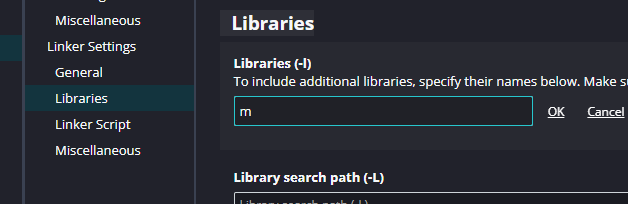
- In Vitis, in your application project go to
Settings -> UserConfig.cmake. - Under
Linker Settings -> LibrariesclickAdd Item - Click the Add button and enter
m