Practical 6 - Bringing it All Together
In the final two weeks, we are going to bring it all together in an embedded development case study. We will use parts of the previous practicals as well as some content from the lectures to create a system which:
- Uses FreeRTOS as its operating system to give us multitasking and easier programming.
- Uses lwIP and Ethernet networking to read messages from the network.
- Passes those messages into a custom IP core which calculates their MD5 hash.
- Coordinates all of this over a serial interface to the user.
- Displays animated graphics over HDMI.
FreeRTOS
You should already be familiar with FreeRTOS from Practical 5, where you learned about task creation, semaphores, and queues. In this practical we’ll extend those concepts and combine them with networking.
Create a new FreeRTOS application project as you did in Practical 5, using your hardware platform that includes your Collatz Conjecture IP.
Now we will need to include the lwIP library. It might already have been added by the tools but we can check by doing:
- Double click on
freertos_practical.prjand click Navigate to BSP settings. - Ensure the Board Support Package for your Domain
freertos10_xilinx_ps7_cortexa9_0is selected and click Modify BSP settings. - Ensure that
lwip211is checked - Important: You must also go to the lwIP settings and make the following two changes:
api_modeset toSOCKET APIdhcp_options.lwip_dhcpset totrue
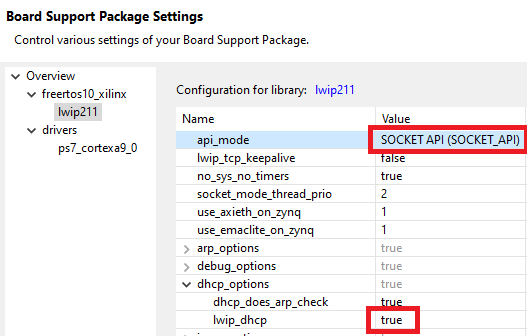
Now we can add our code. In the Explorer pane, under the freertos_practical/src directory, right click and select New File and create two files,main.c and network.c. Copy in the contents from here:
main.c
#include <stdio.h>
#include <string.h>

#include "xparameters.h"
#include "netif/xadapter.h"
#include "xuartps_hw.h"
#include "xil_printf.h"
#include "FreeRTOS.h"
#include "task.h"

#include "lwip/sockets.h"
#include "lwipopts.h"
#include <lwip/ip_addr.h>
#include <lwip/tcp.h>
#include <lwip/udp.h>

#define THREAD_STACKSIZE 1024
#define PORT 51000

//Put your MAC address here!
unsigned char mac_ethernet_address[] = { 0xxx, 0xxx, 0xxx, 0xxx, 0xxx, 0xxx};

//Function Prototypes
void network_init(unsigned char* mac_address, lwip_thread_fn app);
void application_task(void *);
void udp_get_handler(void *arg, struct udp_pcb *pcb, struct pbuf *p, const ip_addr_t *addr, u16_t port);

//------

int main()
{
	//Initialise the network with our MAC address, and the function that should be started as a FreeRTOS task
	network_init(mac_ethernet_address, application_task);

	vTaskStartScheduler(); //Start the scheduler

	//we will only get to here if someone calls vTaskEndScheduler()
	return 0;
}

void application_task(void *p) {
    //This task will set things up and then remove itself once that is done
	xil_printf("application_task started\n\r");

	//Bind a network receiver as we did before
	struct udp_pcb *recv_pcb = udp_new();
	udp_bind(recv_pcb, IP_ADDR_ANY, PORT);
	udp_recv(recv_pcb, udp_get_handler, NULL);

    //Create any other tasks you might need here
    //...
    //...

	vTaskDelete(NULL); //Set up complete so delete ourselves
}

void udp_get_handler(void *arg, struct udp_pcb *pcb, struct pbuf *p, const ip_addr_t *addr, u16_t port) {
    if (p) {
        char msg[p->len + 1];
        memcpy(msg, p->payload, p->len);
        msg[p->len] = '\0';
        printf("Message: %s\n", msg);
        pbuf_free(p);
    }
}
network.c
#include <stdio.h>
#include "xparameters.h"
#include "netif/xadapter.h"
#include "xil_printf.h"

#include "lwip/dhcp.h"
void lwip_init();

#define THREAD_STACKSIZE 1024

//Function prototypes
void print_ip(const char *msg, const ip_addr_t *ip);
void network_thread(void *p);
int network_startup_task();

//Structures and globals
static struct netif server_netif;
struct netif *echo_netif;
unsigned char* mac_addr;
lwip_thread_fn application_task;
TaskHandle_t startuptask, nettask, apptask, rcv_task;

//---------------

//Initialise network task
//This is called by user code to provide the mac address we should use,
//and the code that we should run once the network is ready.
void network_init(unsigned char* mac_address, lwip_thread_fn app) {
	mac_addr = mac_address;
	application_task = app;
	xTaskCreate((lwip_thread_fn) network_startup_task, "startup_task", THREAD_STACKSIZE, NULL, DEFAULT_THREAD_PRIO, &startuptask);
}

//Created by network_init(). Initialises lwIP, runs DHCP, and once connected, starts the application_task that the user provided
//when they called network_init
int network_startup_task()
{
    lwip_init();

    //Create lwIP's network handling thread (as described by lwIP documentation)
    xTaskCreate(network_thread, "nw_task", THREAD_STACKSIZE, NULL, DEFAULT_THREAD_PRIO, &nettask);

    //This task just waits until we get an IP address via DHCP, then creates our application task
    while (1) {
    	vTaskDelay(DHCP_FINE_TIMER_MSECS / portTICK_RATE_MS); //wait 500ms
		if (server_netif.ip_addr.addr) { //Do we have an IP address?
			xil_printf("DHCP request success\r\n");
			print_ip("Board IP: ", &server_netif.ip_addr);
			print_ip("Netmask : ", &server_netif.netmask);
			print_ip("Gateway : ", &server_netif.gw);
			xil_printf("\r\n");
			xTaskCreate(application_task, "app_task", THREAD_STACKSIZE, NULL, DEFAULT_THREAD_PRIO, &apptask);
			break;
		}
	}

    //DHCP is connected and we've created the main task so delete ourselves
    vTaskDelete(NULL); //Passing NULL says to delete this task
    return 0;
}

//lwIP's network handling thread (as described by lwIP documentation)
//Started from the network_startup_task
void network_thread(void *p)
{
    struct netif *netif = &server_netif;
    ip_addr_t ipaddr, netmask, gw;
    int mscnt = 0;

	ipaddr.addr = 0;
	gw.addr = 0;
	netmask.addr = 0;

    // Add our network interface to lwIP and set it as default
    if (!xemac_add(netif, &ipaddr, &netmask, &gw, mac_addr, XPAR_XEMACPS_0_BASEADDR)) {
    	xil_printf("Error adding network interface\r\n");
    	return;
    }
    netif_set_default(netif);
    netif_set_up(netif);

    // Start packet receive thread, this is part of lwIP
    xTaskCreate((void(*)(void*))xemacif_input_thread, "xemacif_input_thread", THREAD_STACKSIZE, netif, DEFAULT_THREAD_PRIO, &rcv_task);

    // Start DHCP. This task will now loop forever calling dhcp_fine_tmr and dhcp_coarse_tmr every so often
    xil_printf("\r\nStart DHCP lookup...\r\n");
    dhcp_start(netif);
    while (1) {
		vTaskDelay(DHCP_FINE_TIMER_MSECS / portTICK_RATE_MS);
		dhcp_fine_tmr();
		mscnt += DHCP_FINE_TIMER_MSECS;
		if (mscnt >= DHCP_COARSE_TIMER_SECS*1000) {
			dhcp_coarse_tmr();
			mscnt = 0;
		}
	}

    return;
}

void print_ip(const char *msg, const ip_addr_t *ip)
{
	xil_printf(msg);
	xil_printf("%d.%d.%d.%d\n\r", ip4_addr1(ip), ip4_addr2(ip), ip4_addr3(ip), ip4_addr4(ip));
}
Task
Build a design in Vitis HLS which synthesises and can, when in a testbench, be passed data and show the correct MD5 output.
Tips
- The first problem you’ll see is that the example implementation uses some types that HLS does not know about, like
uint32_t,size_tetc. Either change these to appropriate types, or create appropriatetypedefs. - The next, is that this implementation uses
malloc()andfree()to create buffers on the heap. This doesn’t work in hardware because any buffers you use have to be declared statically as arrays and cannot bemalloced. This version of the md5 function takes a pointer to aninitial_msgwhich it copies into an newly allocated buffer,msg. Instead, read the msg from shared memory. (Assume a maximum size of 256 bytes.) - Depending on how you do the above, you may find the
to_bytesfunction becomes unimplementable and also needs correcting. In general, try to avoid using pointers. Instead of achar*pointer, you can always just pass an index. - Remember that your toplevel function should keep the same format:
uint32 toplevel(uint32 *ram, uint32 *arg1, uint32 *arg2, uint32 *arg3, uint32 *arg4);- It is tempting to change these to bytes or chars or other 8-bit types because MD5 expects bytes, but do not do this. The physical memory bus on the system is 32 wires wide, and so the
rampointer must remain auint32or HLS will create some hardware with the wrong number of wires! Pack and and unpack the bytes manually.
Task
Once your testbench is giving you the right answer, now that we have functional correctness, we can compile it to hardware as you did in the previous practical, integrate it into your hardware design, and call it from FreeRTOS.
- You can now create a third task in the system. You will now have running at any one time:
ui_task- Handling user serial inputleds_task- Handling buttons and LEDshw_task- Responsible for sending data to, and reading data from, your IP core
Hash Those Cats!
Task
Your final goal is to use our tasking and custom hardware to calculate the MD5 hashes of each Cat Fact as they come in. You will need to devise a way of communicating between the udp_get_handler and hw_task. As udp_get_handler is effectively an interrupt handler, it shouldn’t block or sleep. Create a global data structure that it can write incoming messages into and can be checked periodically by hw_task.
FreeRTOS has a number of data structures for task coordination, for example queues.
Once all of this works, congratulations, you have built a multitasking, networked, embedded system with hardware accelerated MD5 hashing!
Extension: HDMI Graphics
If you really want to stretch your system, now try integrating HDMI graphics. Zybo Z7 HDMI Output describes how to add the necessary HDMI hardware to your design and how to program it from the Arm. You could now connect this up and try to get the hdmi_example_anim.c from that page running along with the rest of your system. How does FreeRTOS interact with the HDMI?